
Business email going to spam is usually a DNS fault
When an owner tells us about business email going to spam, we do not start with the wording of the mail. We start with the DNS of the domain.
DNS is the public notice board for your domain. It tells the world where your website lives and where your mail is delivered. It also holds three small text records that tell a receiving mail server whether a message really came from you.
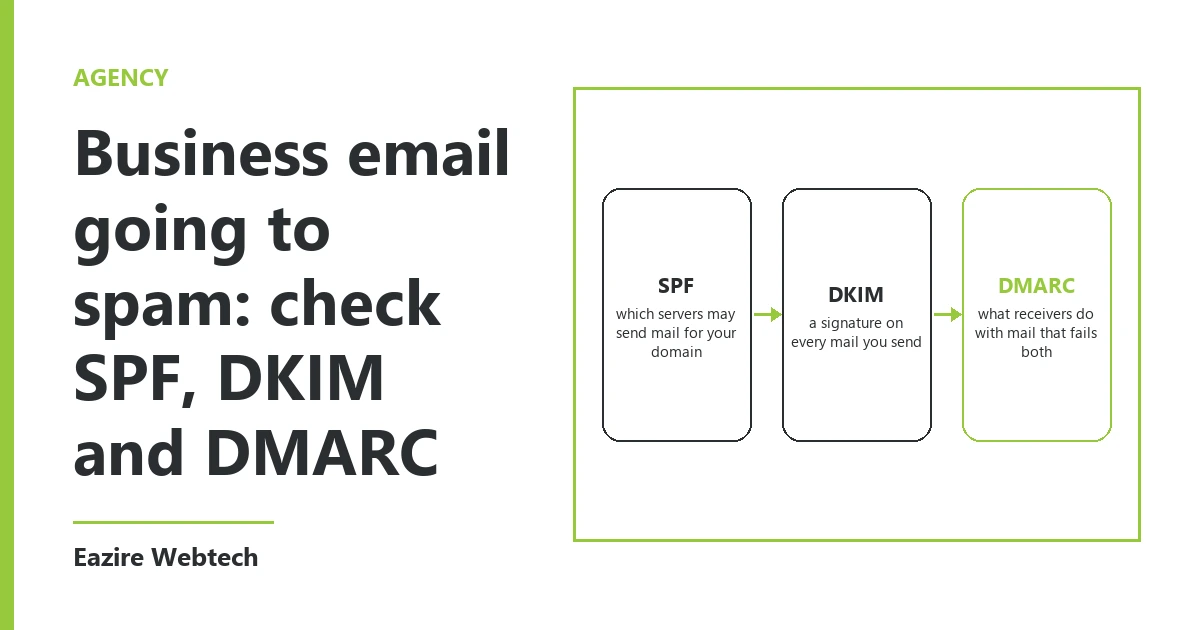
Those three records are SPF, DKIM and DMARC. If one is missing or wrong, the receiving server has no way to tell your quotation from a forgery. The safe choice for that server is the spam folder.
Since February 2024 the large mailbox providers ask for all three from anyone who sends 5,000 or more mails a day to their users. Small senders are asked for at least SPF or DKIM. In practice we set up all three on every domain we host, because the checks are the same for a shop sending ten mails a day.
SPF: the list of servers allowed to send
SPF is one TXT record on your domain. It lists the servers that may send mail in your name.
A typical one reads v=spf1 include:_spf.google.com ~all. The include names your mail provider. The ending says what to do with mail from any server not on the list.
Three rules matter here. A domain may have only one SPF record; two records count as a fail, not as extra cover. The record may cause no more than 10 DNS lookups, and every include uses at least one. And every system that sends as you must be on the list.
That last rule is where most domains break. Your mailbox provider is listed, but your website's contact form sends from the web server. Your billing software sends invoices from its own server. Your newsletter tool sends from a third. Each of those is a sender, and each one missing from SPF is a mail that fails.
DKIM: a signature on every message
DKIM puts a signature in the header of each mail you send. The sending server signs with a private key. The matching public key sits in your DNS, as a TXT record under a name like selector._domainkey.yourdomain.in.
The receiving server reads the signature, fetches the public key and checks that the two match. A match shows two things: the mail came from a system holding your key, and nobody changed it on the way.
You do not write this record by hand. Your mail provider generates the key in its admin panel and shows you the record to copy. Choose a 2048-bit key when the panel offers the choice. After you add the record, go back to the panel and switch signing on. We often find the record published and the signing still off.
Each sending system needs its own DKIM key and its own selector. The newsletter tool gets one. The billing software gets one.
DMARC: the instruction, and the reports
DMARC is a third TXT record, placed at _dmarc.yourdomain.in. It does two jobs.
First, it tells receiving servers what to do with mail that fails both SPF and DKIM. The policy tag has three settings: p=none means deliver it and tell me, p=quarantine means send it to spam, and p=reject means refuse it.
Second, it asks for reports. Add a tag such as rua=mailto:reports@yourdomain.in and the big providers will send a daily summary of every server that sent mail using your domain, with a pass or fail against each.
DMARC also adds a check the other two lack. The domain in the From line, the one your customer sees, must match the domain that passed SPF or DKIM. A mail can pass SPF for your newsletter tool's domain and still fail DMARC, because the From line says yours.
Start with p=none. Read the reports for two to four weeks. You will find senders you had forgotten. Fix each one, then move to quarantine, and later to reject.
How to check yours in five minutes
You need no tool for the first check. Send a mail from your business address to any Gmail address. Open it there, tap the three dots at the top right of the message and choose Show original.
The top of that page has three lines: SPF, DKIM and DMARC. Each one says PASS or FAIL, with the domain it was checked against. Three passes, each showing your own domain, is the result you want.
Then repeat it for every system that sends as you. Fill in your own website's contact form. Send yourself an invoice from your billing software. Send a test from your newsletter tool. Each one is a separate sender and each needs its own three passes.
To see the records themselves, open a command prompt and type nslookup -type=txt yourdomain.in. Look for the line that starts with v=spf1 and count them. There must be exactly one. Then type nslookup -type=txt _dmarc.yourdomain.in. If nothing comes back, you have no DMARC record.
What the records do not fix
The three records prove the mail is yours. They do not make people want it.
If you send to a bought list, people mark the mail as spam, and that count is held against your domain. The large providers ask senders to keep spam complaints below 0.3 percent, which is three complaints in a thousand mails.
A new domain also starts with no history. Sending two thousand mails on its first day looks like a spammer's pattern, even with all three records in place. Start small and grow the volume over a few weeks.
Who should set this up
Whoever controls your DNS. That may be the company that sold you the domain, your hosting company or the agency that built your site. The work itself is short: three records for your mailbox provider, then one SPF entry and one DKIM key for each other system. When we take on a domain, this is part of the website and email setup we do, and we run the Show original test from every sender before we call it done.
The part that takes time is finding the senders. So the question we would ask you is this: how many different systems send mail in your business's name, and who has the login to your DNS.
If you want the three records set and tested on your domain, send us your domain name through the contact page.